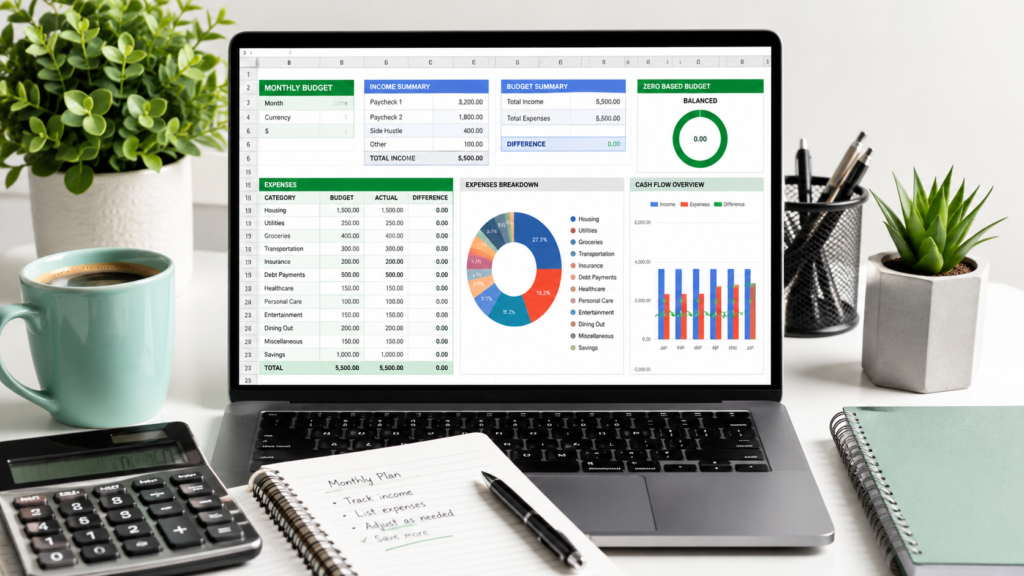
If you’re tired of watching your money disappear without knowing exactly where it went, a zero based budget could be the fix you’re looking for. Combined with Google Sheets, it becomes a flexible, free way to plan every dollar you earn — before you spend it.
This guide walks you through what zero-based budgeting actually means, why Google Sheets works so well for it, and how to set up your own spreadsheet step by step. You’ll also find a free template, common mistakes to avoid, and practical examples for a single person, a couple, and a family.
What Is a Zero Based Budget?
A zero based budget is a method where your income minus your expenses equals zero. That doesn’t mean you spend everything you earn — it means every dollar is assigned a specific job, whether that’s rent, groceries, debt repayment, or savings.
Instead of vaguely tracking spending after the fact, you decide in advance where your money goes. If you have $3,000 in monthly income, you allocate all $3,000 across categories — including savings and an emergency fund — until nothing is left unassigned.
This approach forces intentionality. Nothing gets forgotten because every dollar has a purpose before the month even starts.
Why Use Google Sheets for Zero-Based Budgeting?
There are plenty of budgeting apps available, but Google Sheets remains one of the most popular tools for zero-based budgeting, and for good reason.
- It’s free — no subscription fees or premium tiers.
- It’s flexible — you can customize categories, formulas, and layouts to match your exact financial situation.
- It’s accessible anywhere — available on any device with internet access, and it syncs automatically.
- It’s shareable — ideal for couples or families managing a joint budget together in real time.
- It builds financial awareness — manually entering numbers keeps you more engaged with your spending than an automated app might.
Unlike static templates or paper budgets, a spreadsheet can grow and adapt with your finances, whether you’re budgeting solo or managing a household with multiple income sources.
How to Create a Zero Based Budget in Google Sheets
Setting up your own zero-based budget doesn’t require advanced spreadsheet skills. Follow these steps to build a functional system from scratch.
Calculate Your Monthly Income
Start by listing every source of income you expect to receive during the month — salary, freelance work, side income, or benefits. If your income varies, use a conservative estimate based on your lowest recent month.
Assign Every Dollar a Job
List your expense categories below your income, including fixed costs (rent, insurance, subscriptions), variable costs (groceries, transportation), and savings goals. Keep adding categories and amounts until your total expenses equal your total income.
Track Variable Expenses
Categories like groceries, dining out, and entertainment fluctuate from month to month. Set a realistic cap for each one based on your last two or three months of spending, and adjust as needed once you start tracking actual numbers.
Review Your Budget Weekly
A zero-based budget isn’t a “set it and forget it” tool. Check in weekly to see how your actual spending compares to your plan, and reallocate funds between categories if one is running low and another has extra.
Build an Emergency Fund
Treat your emergency fund contribution as a fixed expense, not an afterthought. Even $50–$100 per month builds a meaningful safety net over time and should be assigned its own row in your spreadsheet.
Customize Your Spreadsheet
Once the basic structure works, tailor it further: color-code categories, add monthly tabs to track trends, or build simple formulas that automatically calculate your remaining balance as you enter expenses.
Free Zero Based Budget Google Sheets Template
Below is a simplified structure you can recreate directly in Google Sheets, or use as a reference if you’re building your own from scratch.
| Category | Budgeted Amount | Actual Spent | Difference |
|---|---|---|---|
| Income | $3,000 | $3,000 | $0 |
| Rent/Mortgage | $1,100 | $1,100 | $0 |
| Utilities | $150 | $140 | +$10 |
| Groceries | $400 | $420 | –$20 |
| Transportation | $200 | $190 | +$10 |
| Debt Repayment | $300 | $300 | $0 |
| Savings | $400 | $400 | $0 |
| Emergency Fund | $100 | $100 | $0 |
| Entertainment | $150 | $160 | –$10 |
| Miscellaneous | $200 | $190 | +$10 |
| Total | $3,000 | $3,000 | $0 |
The key formula behind this structure is simple: Income − Expenses = 0. If your total lands above or below zero, adjust your category amounts until every dollar is accounted for.
How to Organize Your Budget Categories
Grouping your categories makes the spreadsheet easier to scan and manage. A common structure includes:
- Fixed expenses: rent, insurance, loan payments, subscriptions.
- Variable expenses: groceries, fuel, entertainment, personal care.
- Savings and sinking funds: emergency fund, vacation fund, car maintenance, gifts.
- Debt repayment: credit cards, personal loans, student loans.
Sinking funds deserve special attention — these are savings set aside for predictable but irregular expenses, like annual insurance premiums or holiday spending, so they don’t catch you off guard later in the year.
Common Zero-Based Budget Mistakes
Even a solid system can fall apart if a few common mistakes go unchecked.
- Being too rigid. Life changes month to month — your budget should flex with it, not fight against it.
- Forgetting irregular expenses. Annual subscriptions, car registration, or holiday gifts often get left out of monthly planning.
- Not reviewing regularly. A budget you set once and never revisit quickly becomes inaccurate.
- Skipping the emergency fund. Without one, a single unexpected expense can derail the entire system.
- Overcomplicating the spreadsheet. Too many categories or overly complex formulas can make the habit harder to maintain.
Tips to Stick to Your Budget Every Month
- Set a recurring weekly reminder to update your spreadsheet.
- Keep receipts or use your banking app to log expenses in real time.
- Round up estimates slightly for variable categories to avoid constant overspending.
- Celebrate small wins, like sticking to your grocery budget for a full month.
- Adjust categories at the start of each month based on the previous month’s actual numbers.
Zero Based Budget vs Traditional Budget
| Aspect | Zero Based Budget | Traditional Budget |
|---|---|---|
| Approach | Every dollar is assigned a job | General spending limits by category |
| Flexibility | Requires monthly adjustment | Often set once and reused |
| Awareness | High — forces active tracking | Lower — easier to lose track |
| Best for | People who want full control over spending | People who prefer a simpler, hands-off system |
Practical Examples
Zero-Based Budget for a Single Person
A single person earning $2,500 per month might allocate: $900 for rent, $250 for groceries, $150 for transportation, $200 for savings, $100 for an emergency fund, $150 for debt repayment, and the remainder split across utilities, entertainment, and miscellaneous costs — until the total reaches exactly $2,500.
Zero-Based Budget for a Couple
A couple with a combined income of $5,200 might split shared fixed costs (rent, utilities, insurance) from a joint account, while maintaining individual “personal spending” categories within the same spreadsheet — keeping full transparency without micromanaging each other’s discretionary spending.
Zero-Based Budget for a Family
A family of four with $6,800 in monthly income typically needs additional categories: childcare, school expenses, higher grocery costs, and a larger healthcare buffer. Sinking funds become especially useful here for irregular costs like school supplies, birthdays, or family trips.
Frequently Asked Questions
What is a zero based budget?
A zero based budget is a method where income minus expenses equals zero, meaning every dollar is assigned a specific purpose — including savings — before the month begins.
How does zero based budgeting work?
You list all income and expenses, then allocate every dollar to a category until your total expenses match your total income exactly, leaving nothing unassigned.
Is Google Sheets good for budgeting?
Yes. It’s free, flexible, accessible from any device, and easy to customize or share, making it a popular choice for zero-based budgeting.
What’s the difference between a normal budget and a zero based budget?
A traditional budget usually sets general spending limits, while a zero-based budget requires assigning every single dollar a specific job, including savings and debt repayment.
Can I download a free template?
Yes, you can recreate the structure shared in this guide directly in Google Sheets, adjusting categories to match your own income and expenses.
How often should I update my budget?
Ideally, review it weekly and fully update it at the start of each new month based on your previous month’s actual spending.
Is zero based budgeting suitable for beginners?
Yes. While it requires more initial setup than other methods, it’s straightforward to follow and gives beginners a clear, detailed picture of their finances from day one.
Final Thoughts
A zero based budget in Google Sheets gives you a level of financial clarity that’s hard to achieve with vague spending limits or automated apps alone. By assigning every dollar a job — including savings and your emergency fund — you build a system that adapts to your real life instead of fighting against it.
Start simple: list your income, assign your expenses, and adjust as you go. Whether you’re budgeting solo, as a couple, or for a full household, the same core principle applies — plan every dollar before you spend it, and review often enough to keep the plan realistic.